
Reporting Migration: BEx to SAC
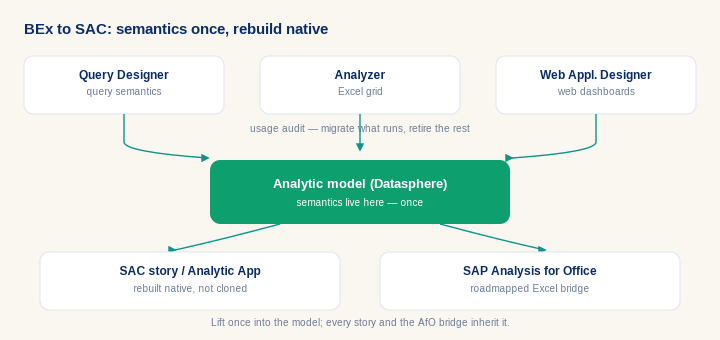
As of 2026-11-08T21:00:00.000Z
Lift BEx query semantics (restricted/calculated key figures, variables, exception aggregation) into the Datasphere/BDC analytic model — consumed by SAC via live connection — so every story inherits them; never re-implement per story. Rebuild visualisation natively in SAC stories (Optimized Story Experience; guided, scripted flows are built as optimized stories with scripting; classic analytic applications are migration items since the classic experience was deprecated end of Q2 2026, KBA 3706882) around the information requirement, not pixel-for-pixel BEx grids. Bridge the Excel power-user revolt with SAP Analysis for Office (AfO) as a deliberate, roadmapped transition tool. Migrate only run reports (usage audit), retire the rest. Architecture + adoption change-leadership is the premium skill; pure rebuilders are commoditised.
What you will learn
- Lift BEx query semantics (restricted/calculated key figures, variables, exception aggregation) into the Datasphere/BDC analytic model so every SAC story inherits them via a live connection, instead of re-implementing per story
- Map each BEx artefact (Query Designer, Analyzer, Web Application Designer) to its correct SAC/Datasphere target and identify when a rebuild — not a port — is required for visualisation
- Design a pragmatic SAP Analysis for Office (AfO) bridge, with a roadmap and glide path, to prevent Excel power-user adoption revolt during the transition to SAC stories
- Run a usage audit on BEx queries and workbooks (BW/BI statistics) to scope migration to actually-run reports and retire the rest
Reporting migration from BEx to SAP Analytics Cloud is where the migration meets the people who actually use the reports — and where programmes that nailed the data layer still fail on adoption. The technical rule is simple and the cultural challenge is hard: lift the query semantics into the model layer; rebuild the visualisation natively in SAC; never try to clone BEx pixel-for-pixel.
The BEx estate and where each part goes
The BEx estate you're replacing. Three tools, three migration stories: BEx Query Designer (the query/semantic layer — restricted key figures, calculated key figures, variables, structures), BEx Analyzer (the Excel-embedded analysis grid power users live in), and BEx Web Application Designer (web dashboards). Each maps differently to the SAC world, and conflating them is the classic mistake.
See Figure 1 — three BEx tools, three destinations.
Prerequisites
- Review core concepts first: C036, C035, C034
Outcomes
- Distinguish which BEx semantics belong in the analytic model versus which behaviours must be rebuilt natively in SAC.
- Map restricted key figures, calculated key figures, variables, and exception aggregation to their SAC/Datasphere equivalents.
- Design an AfO-based transition plan for Excel power users with a defined roadmap.
- Scope a reporting migration using BW/BI usage statistics rather than migrating every existing workbook.
Full module with the Consultant plan — €19.90/month. The full module adds: the decision framework · the end-to-end scenario walkthrough · the KPI scorecard · the anti-patterns · the code blocks · the knowledge check · the diagrams.
Does this module cover an SAP BusinessObjects to SAC migration?
Its core case is BEx to SAP Analytics Cloud, but the rules carry over to an SAP BusinessObjects to SAC migration: audit usage and migrate only the reports people actually run, keep the business semantics in the model layer rather than in each story, and rebuild around the information requirement instead of copying report layouts. The module's resources include an SAP Community post on converting Web Intelligence reports to SAC stories.
Related guides
These guides cite this page as a source.
Open missions
58 live roles and contracts in SAP Analytics Cloud right now — see the SAP Analytics Cloud missions · freelance SAP contracts.