Troubleshooting Datasphere
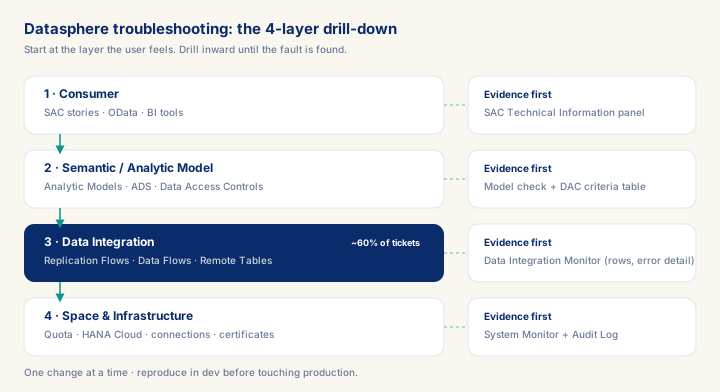
As of 2026-10-04
Datasphere incidents cluster hard: roughly six in ten production support tickets trace back to replication — a Replication Flow stuck on an uneven partition, an SLT delta suspended silently on the source side, or an RFC credential that rotated without telling the analytics team. Consultants who bill at the top of the day-rate band are the ones who diagnose from the Data Integration Monitor outward instead of guessing at the SAC error message, and who leave behind a runbook the next person can execute without a call. This module drills through the four diagnostic layers — consumer, semantic model, data integration, infrastructure — and shows exactly which monitor to open first at each one, using a real stale-dashboard incident end to end. Get the layer wrong and a "no data" ticket burns a day of billable time; get it right and the same ticket closes before lunch with a documented root cause.
What you will learn
- Diagnose a Datasphere incident to its root layer (consumer, semantic model, data integration, infrastructure) instead of guessing from the on-screen symptom.
- Read the Data Integration Monitor, System Monitor, and Audit Log fast enough to close a P1 ticket in under two hours.
- Tell apart the two most-confused authorization failures — space role gaps vs. Data Access Control filters — and fix the right one.
- Turn a resolved incident into a runbook entry and a change-management fix, not just a closed ticket.
Troubleshooting Datasphere: A Senior Practitioner's Diagnostic Framework
SAP Datasphere is a complex, multi-layered platform that combines data integration, federation, data modeling, and governed sharing. When something breaks, the failure surface spans replication pipelines, semantic models, space configuration, identity and access management, and underlying infrastructure. Without a disciplined diagnostic method, teams waste hours chasing symptoms instead of root causes. This module gives you the structured approach that senior practitioners use to resolve Datasphere issues reliably and fast.
The Diagnostic Mindset: Layers, Not Symptoms
The first principle is to resist the temptation to fix the symptom you see on screen. A "data not found" error in a story could reflect a broken replication task, a missing permission on the target space, a misrouted connection group, or a semantic model that references a stale view. Before touching any configuration, determine at which layer the failure originates.
Prerequisites
- Intermediate hands-on experience on SAP analytics projects
- Review core concepts first: C008, C006, C005
Outcomes
- Work through a realistic scenario: A European industrial-equipment manufacturer's finance and sales teams have stopped trusting their Datasphere-backed SAC dashboards after three unexplained data gaps.
- Recognize and avoid the anti-pattern: Fixing the symptom at the consumer layer — re-running the story, clearing the cache — without ever opening the Data Integration Monitor — The replication stays broken.
- Apply the module's core decision: Where to start diagnosing an incident — choose Start at the layer the user experiences, capture the exact error from the relevant monitor.
- Track mastery with the KPI: Mean time to root cause (target: < 2 hours from ticket open to a confirmed root cause for P1 incidents; red flag: > 1 day, or a root cause logged without monitor evidence).
Full module available to members. The full module adds: the decision framework · the end-to-end scenario walkthrough · the KPI scorecard · the anti-patterns · the code blocks · the knowledge check · the diagrams.