Business Layer: Dimensions & Facts
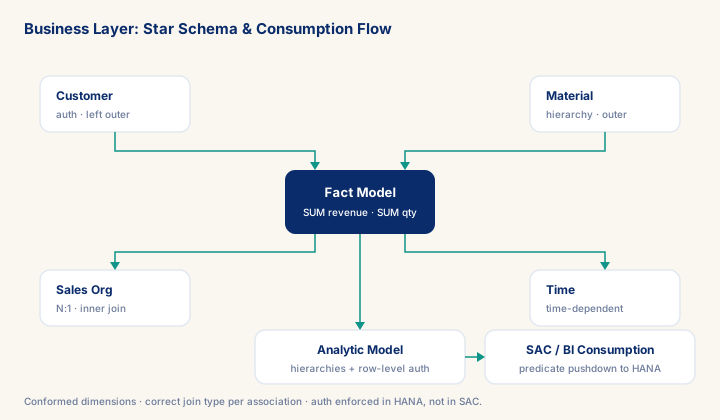
As of 2026-10-10
Get the Business Layer wrong and it never shows up as an error message — it shows up as a revenue total in SAC that is quietly lower than finance's own report, because an inner join dropped every unclassified order. This module is built around the four decisions that determine whether that happens: star vs. snowflake, join type per association, hierarchy type, and where authorization is enforced. The single highest-leverage default is LEFT OUTER JOIN on every optional dimension association, validated with a two-query reconciliation check before go-live. Consultants who can defend that default — and show the diagnostic that proves it — are the ones a partner trusts to sign off a Business Layer without re-checking the numbers.
What you will learn
- Work through a realistic scenario: A European industrial-equipment manufacturer runs S/4HANA with embedded HANA and is replicating sales order and billing data into Datasphere.
- Recognize and avoid the anti-pattern: Fact measures stored inside the dimension — Aggregation breaks: the Business Builder cannot sum a dimension attribute across fact rows.
- Apply the module's core decision: Star schema vs. snowflake for the dimension model — choose Denormalize into a flat, wide dimension.
- Track mastery with the KPI: SAC total vs. source-system total (reconciliation delta).
Business Layer: Dimensions and Facts in SAP Datasphere
Datasphere separates modeling into two distinct builders for a reason: the Data Builder handles technical data objects (tables, views, remote connections, replication), while the Business Builder handles semantic modeling — the layer where raw column data becomes dimensional business concepts that business users, SAC stories, Excel add-ins, and Power BI can query without writing SQL. The Business Layer is where an SAP analytics architect defines what the data means, not just what it contains.
Getting the Business Layer right is the decisive factor in whether an analytics model is maintainable, queryable by non-technical users, and performs correctly under the full range of query patterns that SAC and downstream consumers will generate. Getting it wrong — misclassifying fact columns as dimensions, building snowflake joins where a star schema should be, missing association cardinality declarations — produces models that return wrong aggregates silently, perform poorly, or break when the data expands.
The Three Object Types
The Business Builder works with three object types that mirror a classical dimensional data warehouse:
Prerequisites
- Review core concepts first: C008, C083, C020
Outcomes
- Work through a realistic scenario: A European industrial-equipment manufacturer runs S/4HANA with embedded HANA and is replicating sales order and billing data into Datasphere.
- Recognize and avoid the anti-pattern: Fact measures stored inside the dimension — Aggregation breaks: the Business Builder cannot sum a dimension attribute across fact rows.
- Apply the module's core decision: Star schema vs. snowflake for the dimension model — choose Denormalize into a flat, wide dimension.
- Track mastery with the KPI: SAC total vs. source-system total (reconciliation delta).
Full module available to members. The full module adds: the decision framework · the end-to-end scenario walkthrough · the KPI scorecard · the anti-patterns · the code blocks · the knowledge check · the diagrams.