
Remote Tables & Federation
As of 2026-11-07
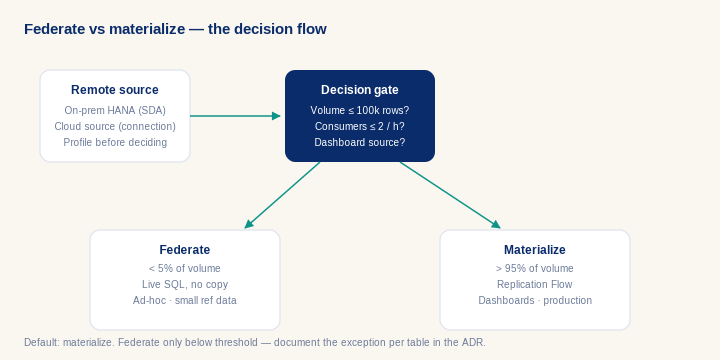
Federation = live SQL to remote source, no copy in DSP. Practice thresholds (not SAP limits): < 5 % of volume, never dashboard sources. Wins on ad-hoc analyst queries, residency-strict reference data. Loses on joins > 100k rows, ≥ 2 consumers/h, dashboards. Document federate-vs-materialize decision per table in ADR; reassess quarterly.
What you will learn
- Work through a realistic scenario: DAX-40 group, on-prem HANA legacy, S/4 in cloud, ad-hoc analyst queries against the legacy.
- Recognize and avoid the anti-pattern: Federate dashboard sources — 5-30s drilldown latency, users abandon.
- Apply the module's core decision: Federate vs materialize — choose: Federate if < 100k rows + < 2 consumers/h + analyst use only; avoid: Federate dashboard sources or joins > 100k rows.
- Track mastery with the KPI: Federated query P95 latency (target: < 10s for analyst use; red flag: > 30s = wrong use).
Module overview
Federation in Datasphere means querying a remote table: an SAP HANA virtual table created when the remote table is deployed, so every read is sent to the source at query time and nothing is copied. The senior rule: federate by decision, not by default. SAP Help itself says that by default an imported remote table is accessed via federation each time, and that replicating it to Datasphere improves performance. Federation is right for exploration, for small reference data and for data that must not be persisted in the cloud; it is a poor default for dashboards used all day, because their response time becomes the source's response time plus the network.
When federation wins. Ad-hoc analyst queries against a small remote table that changes too rapidly to replicate. One-time data exploration before deciding what to ingest. Reference data with strict residency requirements (data must not be persisted outside the source jurisdiction). In all three cases the remote table keeps data access Remote, and every read appears as a statement in Monitoring > Data Integration > Remote Queries.
Prerequisites
- Review core concepts first: C008, C006, C004
Outcomes
- Work through a realistic scenario: DAX-40 group, on-prem HANA legacy, S/4 in cloud, ad-hoc analyst queries against the legacy.
- Recognize and avoid the anti-pattern: Federate dashboard sources — 5-30s drilldown latency, users abandon.
- Apply the module's core decision: Federate vs materialize — choose: Federate if < 100k rows + < 2 consumers/h + analyst use only; avoid: Federate dashboard sources or joins > 100k rows.
- Track mastery with the KPI: Federated query P95 latency (target: < 10s for analyst use; red flag: > 30s = wrong use).
Full module with the Consultant plan — €19.90/month. The full module adds: the decision framework · the end-to-end scenario walkthrough · the KPI scorecard · the anti-patterns · the code blocks · the knowledge check · the diagrams.