Datasphere CLI & APIs
As of 2026-10-10
SAP Datasphere CLI?
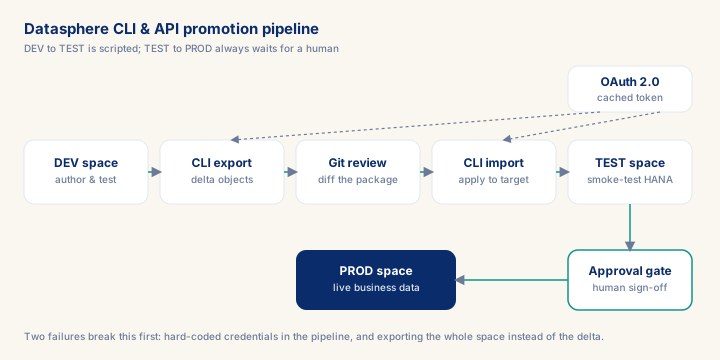
Datasphere CLI & APIs is where a Datasphere project stops depending on one person clicking through the UI and starts behaving like software: version-controlled, repeatable, auditable. The deliverable that pays for the module is the DEV→TEST→PROD content-package promotion pipeline, which replaces manual export/import with a Git-reviewed, five-minute automated run instead of a day of UI clicking. Two failure modes decide whether that pipeline survives production: OAuth client-credential rotation (tokens expire at 3,600 seconds) and the undocumented ~50-calls-per-minute rate limit that throws 429 errors on bulk operations. A consultant who ships this pattern in week one turns a recurring manual bottleneck into a five-minute pipeline step — exactly the automation story that justifies a senior day rate in a scope conversation.
What you will learn
- Work through a realistic scenario: A mid-size industrial equipment manufacturer runs one shared Datasphere tenant across three plants and is scaling its analytics team from 4 to 12 developers.
- Recognize and avoid the anti-pattern: Hard-coding OAuth client_id/client_secret in pipeline YAML — The credential is compromised the moment it lands in Git history.
- Apply the module's core decision: Script the operation or use the UI? — choose Script promotion, bulk space/user provisioning, and replication-flow monitoring.
- Track mastery with the KPI: Promotion cycle time (DEV — TEST) (target: < 10 minutes from merge to imported; red flag: > 1 hour or a human has to babysit the run — the promotion isn't actually automated).
Datasphere CLI and REST APIs: Automation, CI/CD, and When to Script
SAP Datasphere ships with a command-line interface and a REST API layer that most practitioners underuse. The default working mode on Datasphere projects is the browser-based UI: modellers build views in the Data Builder, business users configure semantic layers in the Business Builder, and administrators manage spaces and users through the UI console. This works adequately for a single-team, single-environment delivery. It breaks down the moment you introduce multi-environment promotion, repeatable deployments, automated testing, or any project with more than five developers working in parallel. What follows: the CLI and API tooling in depth — what it can and cannot do, the authentication model, concrete automation patterns, and the trade-offs between scripted and UI-based operations.
The Datasphere CLI
The Datasphere CLI (datasphere) is a Node.js-based command-line tool distributed via npm. The CLI follows SAP Datasphere's calendar-based release versioning (e.g. 2026.x releases track the tenant release cadence) and is the primary operator-level automation interface for Datasphere.
Installation:
npm install -g @sap/datasphere-cli
datasphere --version
Prerequisites
- Intermediate hands-on experience on SAP analytics projects
- Review core concepts first: C008, C006, C005
Outcomes
- Work through a realistic scenario: A mid-size industrial equipment manufacturer runs one shared Datasphere tenant across three plants and is scaling its analytics team from 4 to 12 developers.
- Recognize and avoid the anti-pattern: Hard-coding OAuth client_id/client_secret in pipeline YAML — The credential is compromised the moment it lands in Git history.
- Apply the module's core decision: Script the operation or use the UI? — choose Script promotion, bulk space/user provisioning, and replication-flow monitoring.
- Track mastery with the KPI: Promotion cycle time (DEV — TEST) (target: < 10 minutes from merge to imported; red flag: > 1 hour or a human has to babysit the run — the promotion isn't actually automated).
Full module available to members. The full module adds: the decision framework · the end-to-end scenario walkthrough · the KPI scorecard · the anti-patterns · the code blocks · the knowledge check · the diagrams.
Guides that answer with this page
These guides cite this page as one of the sources their answer rests on.