Advanced SAC: Scripting, APIs & Embedding
As of 2026-10-03
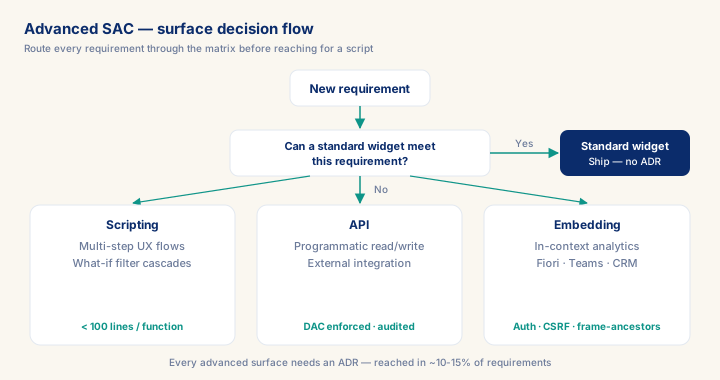
3 advanced surfaces: scripting (multi-step interactivity) · API (programmatic + integration) · embedding (in-context analytics). Senior pattern: standard widget if possible; advanced only with ADR justification. Scripts < 100 lines per function, modular, peer reviewed. API never bypasses DAC. Embedding requires auth + CSRF + frame-ancestors validation. Premium rates live in 10-15 % of projects that need these.
What you will learn
- Apply the surface-decision matrix (standard widget / analytic-application scripting / API / embedding) to route a requirement to the right tool instead of defaulting to script.
- Keep analytic-application scripts maintainable: modular functions under 100 lines, peer-reviewed, version-controlled.
- Design a SAC API integration that always carries user identity and DAC enforcement, and explain why a service-account bypass fails an EU AI Act Art. 10 audit.
- Secure an embedded SAC story with auth, CSRF, and frame-ancestors validation before trusting a parent application.
Module overview
Advanced SAC = scripts, APIs, embedding — the surfaces where SAC stops being "drag-and-drop reporting" and becomes a custom application platform. Senior consultants reach for these only when standard widgets can't meet the requirement, and document the deviation in an ADR. Most projects don't need them; the 10-15 % that do are where premium rates live.
Three advanced surfaces.
- Story and analytic application scripting (classic stories and classic analytic applications are being discontinued in favour of the Optimized Story Experience; see the 2026 section at the end) — JavaScript-like syntax in SAC, lets widgets respond to events, custom interactivity, multi-step workflows. Use for: complex filter cascades, what-if scenario sweeps, bespoke navigation patterns.
- SAC APIs — REST + OData APIs to read/write SAC data programmatically. Use for: external system integration, automated reporting (e.g. PDF generation pipeline), custom mobile apps.
- Embedding — embed SAC stories into SAP Build Apps, Fiori, Teams, Slack, or third-party portals. Use for: in-context analytics where users live (CRM, ITSM, custom apps).
Prerequisites
- Intermediate hands-on experience on SAP analytics projects
- Review core concepts first: C019, C008, C020
Outcomes
- Work through a realistic scenario: Insurance, claims-adjuster app embeds SAC dashboard + custom what-if calculator + REST integration to claims system. 8-week build.
- Recognize and avoid the anti-pattern: Script a problem that's UX refactor — Maintenance debt + UX still bad.
- Apply the module's core decision: Standard widget vs analytic app — choose Widget if expressible; analytic app for genuine multi-step interactivity, not Scripting a problem that's UX refactor.
- Track mastery with the KPI: Script function size P95 (target: < 100 lines; red flag: > 200 lines = unmaintainable).
Full module available to members. The full module adds: the decision framework · the end-to-end scenario walkthrough · the KPI scorecard · the anti-patterns · the code blocks · the knowledge check · the diagrams.