SAC Calculations: Calculated & Restricted Measures
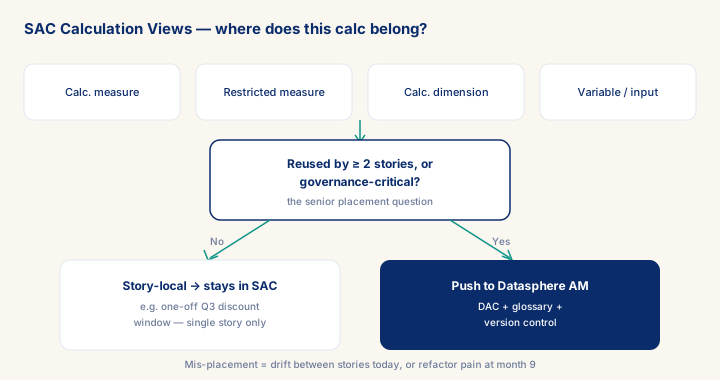
As of 2026-10-04
4 calc primitives: calculated measure · restricted measure · calculated dimension · variable+input. Senior placement rule: ≥ 2 stories → push to Datasphere AM (M003) for DAC + glossary + version control; story-local → a SAC calculation is fine. Heavy calc dim on M+ rows = slow render; pre-compute in DSP. SAC calcs not version-controlled; governance-critical work belongs upstream.
What you will learn
- Choose the right calculation primitive (calculated measure, restricted measure, calculated dimension, variable/input) for a given story requirement.
- Apply the senior placement rule: push any calc reused by two or more stories, or governance-critical, up to a Datasphere analytic model for DAC, glossary, and version control.
- Diagnose and fix slow story rendering caused by heavy calculated dimensions on large row volumes by pre-computing in Datasphere.
- Run a cross-story calc-duplication audit and reduce drift risk by cataloguing every SAC-local calculation.
Module overview
SAC calculations = derived measures + formulas + restricted measures + filtered dimensions defined in SAC, on top of an analytic model. They're the right place for STORY-LEVEL business logic; the wrong place for ENTERPRISE-LEVEL business logic. The senior decision: where does this calculation belong — in the Datasphere analytic model (consumed by all stories), or in this one story?
The 4 calculation primitives.
- Calculated measure — formula combining existing measures (e.g.
margin_pct = (revenue - cost) / revenue). - Restricted measure — measure with embedded filter (e.g.
revenue eu = revenue WHERE country IN (EU members)). - Calculated dimension — derived dimension (e.g.
revenue_band = CASE WHEN revenue > 1M THEN 'large' ELSE 'small'). - Variable + input control — story-time parameter (e.g. fiscal year selector that drives all widgets).
Senior craft signal — placement. A junior puts every calculation in SAC because it's where they're working. A senior asks: "will this be reused?". If yes → push into the analytic model in Datasphere (M003), define once, consume everywhere, gain DAC + glossary. If no → a SAC calculation is fine.
Prerequisites
- Intermediate hands-on experience on SAP analytics projects
- Review core concepts first: C019, C008, C020
Outcomes
- Work through a realistic scenario: Group with 12 SAC stories accumulating ad-hoc calcs over 18 months. Refactor program 6 weeks.
- Recognize and avoid the anti-pattern: Group-wide metric in SAC calc — Drift between stories, audit failure.
- Apply the module's core decision: SAC calc vs DSP AM — choose DSP AM if used by ≥ 2 stories or governance-critical; SAC if story-local, not Group-wide metric in SAC (drift).
- Track mastery with the KPI: Cross-story duplication rate (target: < 5 %; red flag: > 20 % = drift risk).
Full module available to members. The full module adds: the decision framework · the end-to-end scenario walkthrough · the KPI scorecard · the anti-patterns · the code blocks · the knowledge check · the diagrams.