SAC Mobile & Offline
As of 2026-10-09
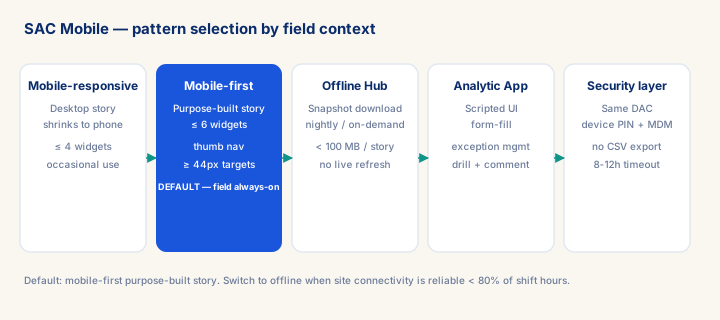
SAC Mobile: 4 patterns (mobile-responsive, mobile-first dedicated, Analytics Hub offline, Analytic Application scripted). Offline = snapshot at download time, NOT live — manage expectation in writing. Mobile design targets: ≤ 6 widgets/page, < 3s LTE, ≤ 50K rows live, < 100MB offline. Tap targets ≥ 44px. Security: device PIN + MDM + no CSV export from offline. Session timeout: 8-12h for field workers.
What you will learn
- Select the correct SAC mobile pattern (responsive / mobile-first / offline / analytic app) for a given field-user scenario
- Design a mobile-first SAC story with ≤ 6 widgets per page, ≥ 44px tap targets, and a data volume < 100MB for offline use
- Configure Analytics Hub offline snapshot with scheduled and wifi-triggered auto-download, and document the snapshot-not-live expectation in the ADR
- Specify MDM/MAM security policy (device PIN, remote wipe, CSV export disabled, session timeout) for a field-worker SAC mobile deployment
Module overview
SAC Mobile brings SAP Analytics Cloud stories to iOS and Android devices — the same governed data, the same Data Access Control security, the same live or import models that power the desktop experience, rendered instead onto a phone or tablet viewport that might be as narrow as 375 pixels. The senior design principle that separates a usable mobile deployment from a frustrating one is that mobile stories have to be designed first for the specific decision a field user needs to make on-site, not produced by shrinking a desktop story and hoping it still works. The junior failure is publishing an existing desktop story to mobile and being surprised when it is unusable — seven widgets stacked vertically on a phone screen, tiny tap targets designed for a mouse pointer, and a live connection timing out over a weak cellular signal in a warehouse basement. The senior craft is building purpose-specific mobile stories, capped at roughly six widgets per page, with generously sized tap targets, and — where connectivity cannot be relied on — genuine offline capability built in from the start rather than retrofitted after the first field pilot fails.
Prerequisites
- Review core concepts first: C008, C019, C020
Outcomes
- Select the correct SAC mobile pattern (responsive / mobile-first / offline / analytic app) for a given field-user scenario.
- Design a mobile-first SAC story with ≤ 6 widgets per page, ≥ 44px tap targets, and a data volume < 100MB for offline use.
- Apply the module's core decision: Mobile pattern selection — choose Mobile-first for field-always; offline for remote-no-connectivity; scripted app for form-fill + analytics combined.
- Track mastery with the KPI: Mobile page load (LTE) (target: < 3s P95; red flag: > 6s = widget count or data volume too high).
Full module available to members. The full module adds: the decision framework · the end-to-end scenario walkthrough · the KPI scorecard · the anti-patterns · the code blocks · the knowledge check · the diagrams.