
SAC Commenting & Collaboration
As of 2026-11-22
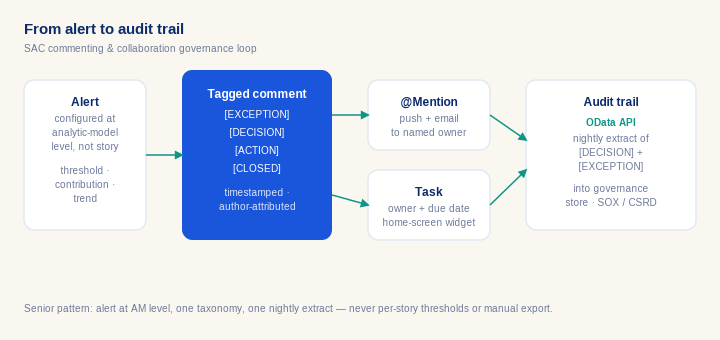
SAC commenting = governance artefact, not a UX feature. Documented building blocks: data point comments on table cells (saved immediately, invisible without data access), @mentions with in-app notifications, calendar tasks with assignees and due dates, and scheduled publications (Broadcast sends the owner's view, Burst each SAC user's authorised data). Senior pattern: comment taxonomy [EXCEPTION][DECISION][ACTION][CLOSED] agreed before go-live; exception rule defined once, not per story; planning sign-off through comments and calendar tasks instead of email chains; audit evidence path agreed with internal audit, with any comment export API confirmed for the release before it is promised.
What you will learn
- Design a 4-tag comment taxonomy ([EXCEPTION][DECISION][ACTION][CLOSED]) with trigger conditions and resolution criteria agreed with the business before go-live
- Define each exception rule once, in the model or a shared calculation, so the same variance is flagged the same way in every story
- Run the planning sign-off through data point comments and calendar tasks instead of email chains, and measure the close-cycle change on your own baseline
- Agree the audit evidence path with internal audit and confirm, for the release, which API (if any) exports comments before promising an extract
Module overview
SAC commenting and collaboration turns a passive analytics dashboard into an active decision workspace, where business users annotate a chart, assign a follow-up action, and record a decision without ever leaving the analytics context they were already looking at. The insight that separates a senior consultant's design from a default, unconfigured rollout is this: commenting is not primarily a user-experience nicety, it is a governance artefact. Every annotation left on a KPI is a timestamped, attributed business decision, and a year's worth of them, collected consistently, becomes the audit trail of how the organization actually reacted to what its own data told it — which is precisely the evidence a controller, an auditor, or a regulator asks for when they want to know not just what the numbers were, but what the business did about them. The features in scope are listed in SAP Help — Commenting and Collaboration.
Source: SAP Analytics Cloud — Commenting and Collaboration
Prerequisites
- Review core concepts first: C019, C008, C020
Outcomes
- Design a 4-tag comment taxonomy ([EXCEPTION][DECISION][ACTION][CLOSED]) with trigger conditions and resolution criteria agreed with the business before go-live.
- Define the exception rule once (threshold in the model or a shared calculation) so the same values are flagged in every story that uses the model.
- Apply the module's core decision on the comment taxonomy: define [EXCEPTION][DECISION][ACTION][CLOSED] with the business before go-live and train story owners, rather than allowing free-text comments that are noise and not auditable.
- Track mastery with the KPI: Comment taxonomy adoption rate (target: 100 % of comments use defined tags; red flag: < 60% tagged = training needed, taxonomy rejected).
Full module with the Consultant plan — €19.90/month. The full module adds: the decision framework · the end-to-end scenario walkthrough · the KPI scorecard · the anti-patterns · the code blocks · the knowledge check · the diagrams.
Open missions
58 live roles and contracts in SAP Analytics Cloud right now — see the SAP Analytics Cloud missions · freelance SAP contracts.