
Prompt Engineering for SAP
As of 2026-11-08
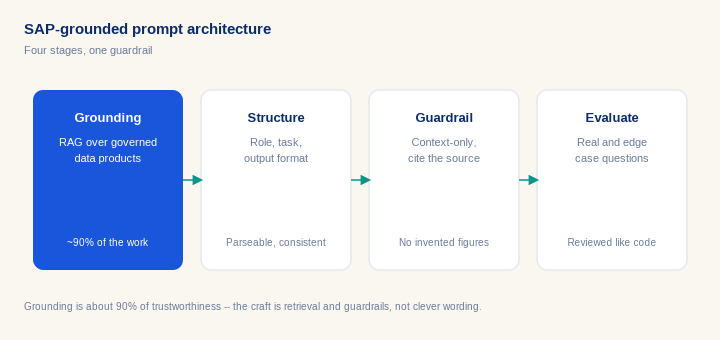
This course teaches you to build a grounded prompt for a Datasphere or Business Data Cloud use case and run it like code. You write a one-page skill specification (data product, fields, glossary definition, time window), assemble the five prompt blocks in a fixed order (role, guardrails, glossary, output contract, question and context), store the template in the Prompt Registry of the generative AI hub in SAP AI Core and call it through the orchestration service with masking and an input filter. One finance case runs from start to finish: a skill that explains an EMEA revenue variance from dp_finance_revenue and declines when the data is silent. Deliverables: the guardrail block, a 30-question golden set with release thresholds, and a release note that moves a skill from orchestration V1 to V2 with explicit caching.
What you will learn
- Write a five-block grounded prompt (role, guardrails, glossary, output contract, question and context) for a Datasphere data product and name the retrieval fields and time window
- Call a templated prompt through the orchestration service with placeholderValues, data masking and an input filter with prompt shield
- Save a prompt and its orchestration configuration to the Prompt Registry and write a release note with a version and change log
- Build a 30-row golden set with unanswerable and injection rows and apply thresholds such as 100 % refusal precision
- Choose between an ad hoc question, a Joule Studio skill and an agent, and place a cache_control breakpoint on the last stable block
- Diff-review an optimised prompt and reject it when the refusal sentence has been shortened
Module overview
On a client project the prompt is not the product; the retrieved context, the output contract and the refusal rule are. This module teaches you to build a grounded prompt for a Datasphere or Business Data Cloud (BDC) use case, store it in the Prompt Registry of the generative AI hub in SAP AI Core, call it through the orchestration service, test it against a golden set and release it with a change log. You work on one case from start to finish: a finance skill that explains a quarter-on-quarter revenue variance and declines to answer when the data does not cover the question. Statements about product status are as of 28 October 2026; confirm each in your tenant before promising it to a client. SAP now publishes platform offerings under the SAP Business AI Platform name (for example "SAP Business AI Platform, ABAP environment", SAP Community topic page); service names such as SAP AI Core keep their names (SAP Community, 29 Sep 2026).
Prerequisites
- governed data products and the semantic layer that supply the retrieved context
- Access to an SAP AI Core instance with a resource group and a model deployment or the orchestration service
Outcomes
- Write a skill specification that names the data product, the fields, the one accepted glossary definition and the time window before the first prompt draft.
- Assemble a grounded prompt in five blocks — role, guardrails, glossary, output contract, question and context — with retrieved text wrapped in <context> delimiters.
- Call a Prompt Registry template through the orchestration service with placeholderValues, DPI masking and prompt_shield on the input filter.
- Choose between an ad hoc Joule question, a Joule Studio skill, an agent, explicit caching and a prompt optimisation run.
- Build a 30-question golden set with release thresholds and re-run it after every prompt, model, optimisation or glossary change.
Full module with the Consultant plan — €19.90/month. The full module adds: the decision framework · the end-to-end scenario walkthrough · the KPI scorecard · the anti-patterns · the code blocks · the knowledge check · the diagrams.