
Performance Tuning with HANA
As of 2026-11-08
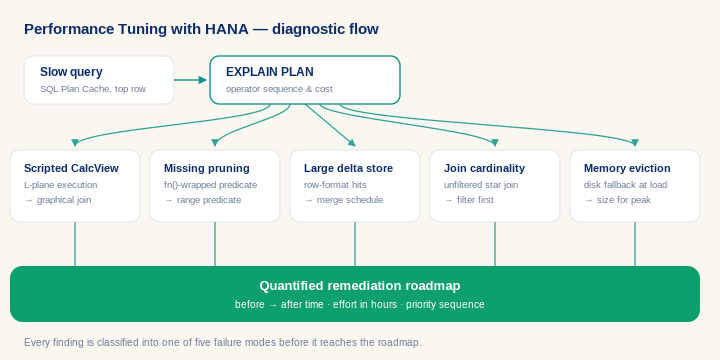
HANA performance degradation is a frequent post-go-live crisis on SAP analytics projects, and it usually resurfaces as an emergency call, not a scheduled review. A consultant who arrives with an EXPLAIN PLAN, names the root cause among five known failure modes within the first hour, and leaves a quantified remediation roadmap is solving a crisis a generic configuration consultant cannot. This module teaches exactly that: reading HANA execution plans, applying partition pruning, diagnosing scripted calculation view bottlenecks, and producing the performance investigation report a client IT director signs off on.
What you will learn
- Read and interpret an HANA EXPLAIN PLAN to identify high-cost operators, missing partition pruning, and procedural execution of scripted (SQLScript) calculation views — producing a prioritised performance finding list from a real client scenario
- Apply partition pruning principles to SQL predicates: rewrite function-wrapped predicates (YEAR(), MONTH(), CAST()) to pruning-safe range predicates and verify pruning in the EXPLAIN PLAN
- Diagnose the five HANA performance failure modes (scripted calculation views / missing partition pruning / large delta stores / star join cardinality explosion / memory eviction under concurrent load) from HANA Cockpit metrics and SQL Plan Cache data
- Produce a performance investigation report: top-10 slow queries with root-cause classification, quantified remediation impact, effort estimates, and a prioritised remediation roadmap
Module overview
HANA performance tuning is the discipline that separates a Datasphere or BW/4HANA deployment a client can operate reliably for ten years from one that degrades under real workload within months of go-live. Every senior SAP analytics consultant must know how to read an EXPLAIN PLAN, understand the HANA storage architecture, apply partition pruning, and diagnose calculation view bottlenecks — because performance problems are a frequent reason clients reopen a project after handover and a frequent reason day-rate conversations stall. In SAP Datasphere the starting points are the Runtime Metrics tool in the Data Builder, the View Analyzer in the Data Integration Monitor and the Expensive Statement Logs in the Monitoring app, all covered below.
Prerequisites
- Intermediate hands-on experience on SAP analytics projects
- Review core concepts first: C040, C038, C041
Outcomes
- Interpret an HANA EXPLAIN PLAN and identify the specific operator responsible for a query performance problem.
- Rewrite function-wrapped SQL predicates to enable partition pruning and verify the result.
- Diagnose HANA performance failure modes from HANA Cockpit and SQL Plan Cache diagnostics.
- Produce a performance investigation report that a client IT director can use for remediation prioritisation.
Full module with the Consultant plan — €19.90/month. The full module adds: the decision framework · the end-to-end scenario walkthrough · the KPI scorecard · the anti-patterns · the code blocks · the knowledge check · the diagrams.