Capacity & Workload Management
As of 2026-10-06
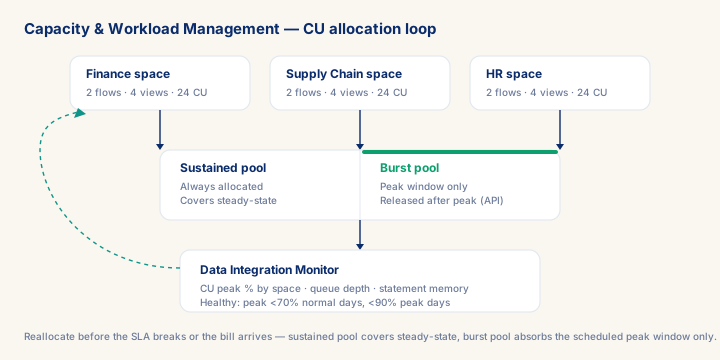
Every SAP Business Data Cloud tenant runs on Capacity Units — get the allocation wrong and a space either starves (silent load failures, stale dashboards) or sits idle while SAP keeps billing. The decision that matters in week one: size CUs against the modelling layer's fanout, not the source data volume, then split the allocation into a sustained pool for steady-state and a burst pool released outside the month-end peak window. A space running consistently above 80% CU peak on ordinary days is undersized; one sitting below 30% every day is over-allocated and quietly wasting budget. Consultants who can size, monitor, and defend that allocation to a CTO or CFO — with the utilisation data to back a reallocation case — hold a scarce, premium skill: most practitioners who touch BDC never operate it at this level on a live enterprise deployment.
What you will learn
- Work through a realistic scenario: A European discrete-manufacturing group is bringing a new plant's S/4HANA instance online inside an existing multi-space BDC tenant.
- Recognize and avoid the anti-pattern: Sizing CUs against source-data volume instead of modelling fanout.
- Apply the module's core decision: Replication Flow vs Data Flow vs Federation for a new source — choose Replication Flow (log-based CDC) for S/4HANA or BW/4HANA sources needing sub-15-minute latency.
- Track mastery with the KPI: CU peak utilisation (per space) (target: < 70% on non-month-end days, < 90% on peak days; red flag: > 80% sustained on regular days for more than a week — the space is undersized).
Module overview
SAP Business Data Cloud capacity and workload management is the discipline that keeps a multi-space BDC environment billable to the right accounts, responsive under peak load, and defensible to a CTO who wants to understand what they are paying for. The resource unit is the Capacity Unit (CU) — a composite of memory, CPU, and I/O entitlement that SAP charges against and that the administrator must allocate across spaces before any processing can run. Get the allocation wrong and two failure modes follow: under-allocated spaces block data flows, causing silent load failures that surface as stale dashboards; over-allocated spaces sit idle while the billing meter runs, which is the conversation the finance team will have with you.
Prerequisites
- Intermediate hands-on experience on SAP analytics projects
- Review core concepts first: C038, C041, C040
Outcomes
- Work through a realistic scenario: A European discrete-manufacturing group is bringing a new plant's S/4HANA instance online inside an existing multi-space BDC tenant.
- Recognize and avoid the anti-pattern: Sizing CUs against source-data volume instead of modelling fanout.
- Apply the module's core decision: Replication Flow vs Data Flow vs Federation for a new source — choose Replication Flow (log-based CDC) for S/4HANA or BW/4HANA sources needing sub-15-minute latency.
- Track mastery with the KPI: CU peak utilisation (per space) (target: < 70% on non-month-end days, < 90% on peak days; red flag: > 80% sustained on regular days for more than a week — the space is undersized).
Full module available to members. The full module adds: the decision framework · the end-to-end scenario walkthrough · the KPI scorecard · the anti-patterns · the code blocks · the knowledge check · the diagrams.