Python in SAP Data Pipelines
As of 2026-10-10
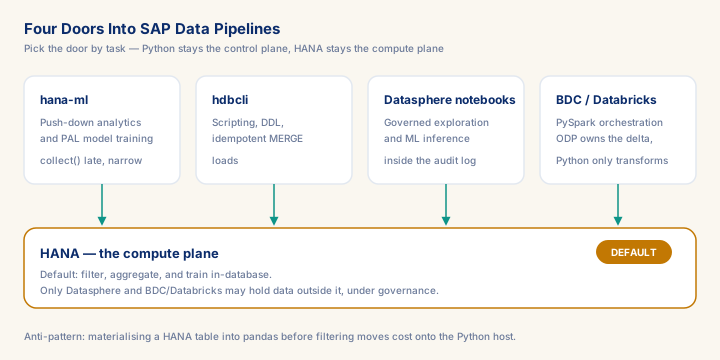
Python enters SAP pipelines through four distinct doors — hana-ml push-down analytics, hdbcli scripting, notebooks connected through Datasphere's Open SQL Schema, and BDC/Databricks orchestration — and the first decision on any engagement is picking the right door, not writing the code. Get it wrong and either HANA's push-down advantage is lost (pulling millions of rows into pandas that HANA would have aggregated in place) or the ODP delta queue gets duplicated by home-grown checkpoint logic in PySpark. Consultants who can make that call, back it with an idempotent MERGE pipeline, and pin their dependency chain against SAP's HANA Cloud and Data Flow runtime upgrades sit at the SAP-plus-Python intersection the EMEA market pays €900–1,400 a day for. This module is the decision map for that intersection, not a syntax tour.
What you will learn
- Architect hana-ml pipelines that keep computation inside the HANA engine — designing DataFrame transformation chains that defer `.collect()` to the final step, and storing PAL model artifacts in HANA rather than in local Python state
- Build idempotent hdbcli-based data loading scripts using MERGE statements and batch executemany patterns, with correct connection lifecycle management for Multi-Tenant HANA Cloud environments
- Connect an external notebook (BAS or local Jupyter) to Datasphere through an Open SQL Schema database user for push-down profiling and in-database ML inference, and place scheduled row-level Python in the Data Flow script operator — without exporting data outside the governed fabric
- Distinguish Python's appropriate role in BDC/Databricks orchestration from ABAP ODP extraction mechanics, preventing double-processing by avoiding redundant delta logic in PySpark transformation code
Python's Real Role in SAP Data Pipelines
Python entered the SAP analytics landscape through three distinct doors, and conflating them leads to architectural mistakes. The first door is hana-ml, SAP's own Python client for HANA Predictive Analysis Library (PAL) and HANA machine learning functions — it exposes PAL algorithms (K-Means, Random Forest, time series decomposition) as Python objects that push computation into the HANA engine, leaving training data in-database. The second door is hdbcli, the low-level Python DB-API 2.0 driver for HANA, suited for scripting data loads, running DDL migrations, and building lightweight operational tooling. The third door is a notebook connected to Datasphere from outside the tenant — Jupyter in SAP Business Application Studio or on your machine, reaching the Space through an Open SQL Schema database user with hana_ml. Datasphere ships no embedded notebook; the only Python that runs inside it is the Data Flow's Python script operator, a scheduled pandas step, not an interactive environment.
Prerequisites
- Intermediate hands-on experience on SAP analytics projects
- Review core concepts first: C087, C083, C047
Outcomes
- Work through a realistic scenario: A European industrial manufacturer is migrating BW/4HANA sales reporting onto Datasphere and SAP Business Data Cloud.
- Recognize and avoid the anti-pattern: Materialising a HANA table into pandas before filtering — Moves computation from the HANA engine to the Python host.
- Apply the module's core decision: hana-ml DataFrame vs hdbcli for a given pipeline task — choose hana-ml for push-down analytics and PAL model training, deferring .collect() to the last and narrowest step.
- Track mastery with the KPI: Push-down ratio (target: >= 90% of pipeline steps execute inside HANA before the first .collect).
Full module available to members. The full module adds: the decision framework · the end-to-end scenario walkthrough · the KPI scorecard · the anti-patterns · the code blocks · the knowledge check · the diagrams.