
FinOps for Data Platforms
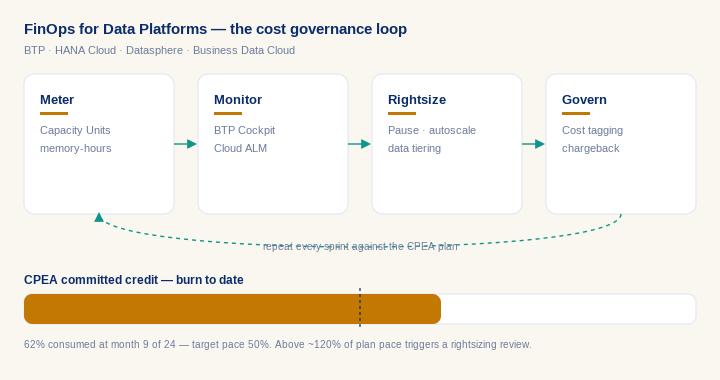
As of 2026-11-08
FinOps for Data Platforms is the discipline that stops a BTP CPEA credit block from being exhausted eight months into a 24-month commitment — a failure the CFO notices before the architect does. The core decision is where to intervene first: scheduled pause/resume on dev and UAT HANA Cloud instances alone cuts their memory-hours by roughly 58% in illustrative arithmetic (storage keeps billing), and defaulting to replication over federated remote access removes a frequent runaway-cost pattern in Datasphere landscapes. Consultants who can read a BTP Cockpit burn-rate, name the top three cost drivers, and price the fix in implementation days rather than vague savings are the ones invited into the CFO conversation, not only the CIO's. The standard entry point is a two-to-three-day consumption review; no primary source publishes a rate premium for combining Datasphere architecture with BTP FinOps governance, so quote none and price the review on its scope.
What you will learn
- Explain BTP/Datasphere/HANA Cloud consumption pricing mechanics (Capacity Units, memory-hours, autoscaling) and calculate the cost impact of specific architecture decisions
- Design cost governance structures including subaccount tagging strategies, chargeback vs showback policies, and change-gating processes for new analytics workloads
- Identify the top three cost drivers in a live BTP landscape using Cockpit consumption data and produce a quantified rightsizing recommendation
- Assess trade-offs between live connection and replication patterns in Datasphere, and select the cost-optimal integration approach for a given data currency requirement
What Cloud Consumption Pricing Actually Means for SAP Analytics
The shift from licence to consumption is structural, not cosmetic. Before BTP existed, a customer bought a fixed SAP licence, deployed it on-premise, and the cost was largely insensitive to how much they queried. (At SAP Sapphire on 12 May 2026, SAP announced the SAP Business AI Platform, which brings together SAP BTP, SAP Business Data Cloud and AI Foundation; the metering logic below still applies per service.) With BTP, Datasphere, HANA Cloud, and Business Data Cloud, every analytical workload translates directly to a line on the invoice. On BTP, cloud credits under a CPEA or BTPEA are consumed when you run an integration flow or an AI scenario runs inference; in Datasphere and Business Data Cloud, Capacity Units (CUs) are consumed when a space runs a live connection query or you schedule a data flow. HANA Cloud instances bill by the hour based on their memory allocation, regardless of whether queries are executing. BDC adds further consumption layers once its federated intelligence features invoke underlying Datasphere and HANA Cloud compute. The Sapphire keynote article of 13 May 2026 describes the platform that now frames these meters (SAP News Center).
Prerequisites
- Intermediate hands-on experience on SAP analytics projects
- Review core concepts first: C090, C087, C083
Outcomes
- Work through a realistic scenario: A European manufacturing group's SAP Datasphere landscape is burning its BTP CPEA credit at 140% of forecast nine months into a 24-month block, and the CFO has asked for a consumption review before approving the next tranche.
- Recognize and avoid the anti-pattern: Leaving dev/UAT HANA Cloud instances unpaused overnight and on weekends — A 64 GB dev instance costs close to a small productive instance for zero delivered value outside business hours.
- Apply the module's core decision: CPEA committed credits vs pay-as-you-go — choose: Commit under CPEA only when 12 months of usage history show steady, predictable growth; size the block just under last year's peak, not the average; avoid: Sizing the CPEA block to a single quarter-end peak — it locks in wasted spend for the other three quarters of every year.
- Track mastery with the KPI: BTP CPEA burn rate vs plan (target: 95-105% of straight-line forecast at any checkpoint; red flag: Burn above 120% of straight-line plan with more than six months remaining on the commitment).
Full module with the Consultant plan — €19.90/month. The full module adds: the decision framework · the end-to-end scenario walkthrough · the KPI scorecard · the anti-patterns · the code blocks · the knowledge check · the diagrams.