No-Code Automation: Make, n8n, Zapier
As of 2026-10-03
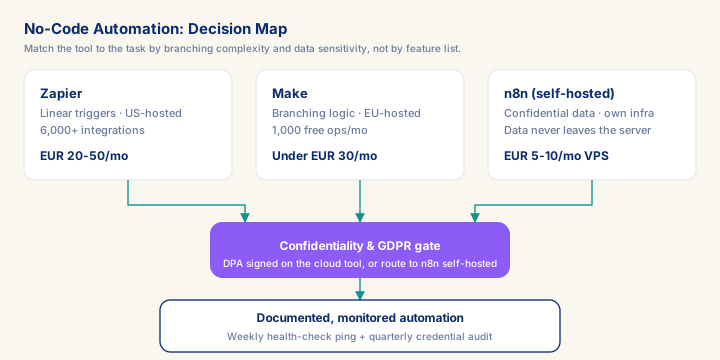
Choosing a no-code automation stack is a three-way trade-off between cost, branching complexity, and where client data lives — not a feature comparison. Zapier's per-task pricing suits simple, linear workflows at €20-50/month for 500-2,000 tasks, but it routes data through US servers, which creates GDPR exposure without a signed DPA. Make's EU hosting and operations-based pricing (1,000 free ops/month) fit branching workflows at lower cost, while n8n self-hosted keeps confidential client data off any third-party server for €5-10/month, at the price of running your own VPS. The default for most independent SAP analytics consultants: start on Make for speed, move to n8n self-hosted the moment a workflow touches contract, financial, or personal data covered by an NDA. Get this decision right once and you save 20-30 minutes a week on status reporting alone — six to eight hours per engagement — while avoiding the compliance exposure a careless Zapier-only setup creates.
What you will learn
- Assess Make, n8n, and Zapier against the real operational needs of an independent SAP analytics consultant, with an honest comparison of cost, complexity, and data privacy exposure
- Identify which parts of a consultant's own operations — lead tracking, invoicing, content distribution — are worth automating and which create more overhead than they save
- Build and maintain a working automation for at least one administrative task without writing code, while understanding where no-code tools fail and what to do when they do
- Communicate the value of personal automation infrastructure to clients as evidence of operational maturity, not as a technical side-project
The pitch for no-code automation tools is persuasive: connect your apps, automate repetitive work, reclaim hours every week. The reality for an independent SAP analytics consultant is more nuanced. The tools are real and genuinely useful for a defined set of tasks. They are also a source of complexity, data privacy risk, and maintenance overhead if deployed without discipline. This module gives you a practitioner's honest view — what to automate, which tool fits which task, and where to stop.
The three tools, honestly compared
Zapier is the most accessible and most expensive of the three. Its user interface is the friendliest for non-technical users, its app library is the largest (6,000+ integrations), and its pricing scales aggressively with task volume. For an independent consultant running 500-2,000 tasks per month, the Growth plan at around €20-50/month is workable. The fundamental constraint is that Zapier is designed for linear, single-trigger workflows. If you need branching logic — 'if the lead came from LinkedIn, route it differently than one from a conference badge scan' — the multi-step filter logic becomes complicated quickly. Zapier is also US-based, which is material for GDPR compliance if you are routing client contact data through their servers.
Prerequisites
- Intermediate hands-on experience on SAP analytics projects
- Review core concepts first: C089, C087, C067
Outcomes
- Work through a realistic scenario: An independent SAP analytics consultant is six weeks into a Datasphere migration for a mid-size industrial manufacturer.
- Recognize and avoid the anti-pattern: Building the failure alert last, or never — The connected API changes, lead capture stops working, and nobody notices for weeks.
- Apply the module's core decision: Which tool for a new automation task — choose Default to Make for branching workflows under roughly €30/month in operations.
- Track mastery with the KPI: Silent-failure catch rate (target: 100% of live automations have a scheduled health check; red flag: Any automation with no check for 30+ days).
Full module available to members. The full module adds: the decision framework · the end-to-end scenario walkthrough · the KPI scorecard · the anti-patterns · the code blocks · the knowledge check · the diagrams.