Email Mastery: Finishing at Inbox Zero
As of 2026-10-03
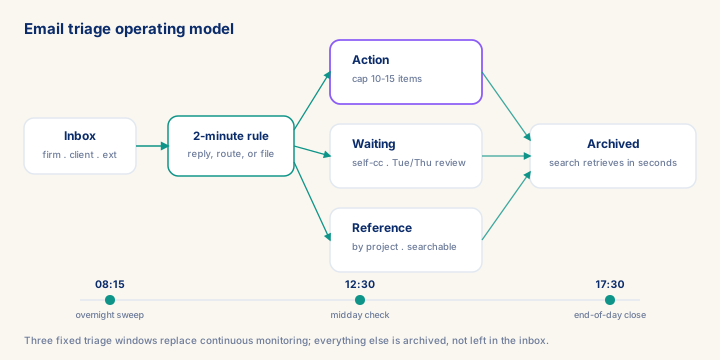
Consultants who run continuous email monitoring lose 3.5-4 hours a day to context-switching; a disciplined three-folder system and three fixed triage windows cut that to roughly 1.5 hours. The module gives a senior consultant the exact folder structure (Action capped at 10-15 items, Waiting, Reference), four ready-to-customise templates, and the language to turn 'never drops a ball' into a rate-justifying claim in a client conversation.
What you will learn
- Set up and operate the three-folder triage system (Action / Waiting / Reference) within the first week of an engagement
- Apply the two-minute rule and three daily triage sessions to eliminate continuous email monitoring
- Build and deploy four project-specific templates (status update, meeting request, deliverable submission, escalation) that save time without sacrificing relationship quality
- Reduce incoming email volume through upstream interventions and expectation-setting at project kick-off
The consultant's email problem is structural, not motivational
Most advice on email management assumes the problem is laziness or poor habits. For a consultant, the problem is structural: you receive mail from at least three distinct ecosystems simultaneously—your consulting firm's internal traffic, the client's project communications, and external contacts (recruiters, vendors, other consultants). Each ecosystem has its own urgency conventions, its own tone, and its own expectations about response time. A senior manager at a Big 4 firm firing a Saturday afternoon message expects a different response curve than a client project coordinator asking for a document. Managing these three streams with a single undifferentiated inbox guarantees cognitive overload and slow triage.
The inbox-zero goal is not about the number zero. Newport, Allen, and Merlin Mann all make this clear. Inbox zero means every message has been processed—read, decided upon, and moved to an actionable bucket—not that you have replied to everything. A processed inbox may contain 200 messages in labelled folders. An unprocessed inbox of 12 messages, where three are awaiting a decision you have not made, is not inbox zero.
Prerequisites
- Review core concepts first: C087, C091, C090
Outcomes
- Work through a realistic scenario: A consultant joins a 4-month SAP Analytics Cloud engagement at a mid-size industrial manufacturer and inherits three simultaneous mail streams -- the firm's internal traffic.
- Recognize and avoid the anti-pattern: Treating the inbox as a to-do list.
- Apply the module's core decision: How many folders to run beyond the inbox — choose Exactly three -- Action, Waiting, Reference -- nothing more.
- Track mastery with the KPI: Action folder size (target: <= 10-15 items at all times; red flag: Consistently above 15 for more than two days -- signals re-filing, not processing).
Full module available to members. The full module adds: the decision framework · the end-to-end scenario walkthrough · the KPI scorecard · the anti-patterns · the knowledge check · the diagrams.